
Originally published at braginskyoleg.com.
Processes like bones of the skeleton of your organisation. Set them right, and it will grow and thrive. Make a mistake, and you have to bear the cost of it. With Maksim Golub and founder of School of Troubleshooters Oleg Braginsky, we review the procedure of onboarding and offboarding employees using Atlassian suite.
When it comes to bringing new employees to your company or saying goodbye to them, the businesses of different size would use different approaches. One of the principles of Organisation Design says that you should think big even when you still of the small size, setting a rock-solid foundation for the years to come.
There is a good reason to set the flow correctly form the beginning. First, it is the impression that your new employee gets at the beginning of their and what they will be sharing when they out. Building a good brand and image of the company is important and there are no small things there. Every single detail matters.
Second is the optimal allocation and usage of the resources, which is the result of thorough planning. Put it simple: you and your squad will need to make sure that each of the team members will have what they need for their work on the day one. If they don’t, it means they won’t be able to produce expected results.
On the opposite side, when it comes to offboarding people, the vertical’s owner needs to make suite that the process will run smoothly and all of the assets and artefact collected thoroughly, whether it is a hardware, intellectual property, accesses portfolio of projects with documentation or existing contracts.
Having a messy or not well-defined workflow will come with the price. It’s eventually leads to lost, damaged, replaced inventory, paying extra cost for ghost seats, or having someone secretly piggybacking on shared accesses, breaking the compliances, compromising the security of product or privacy of customers.
To solve the problem and set the process right we will use Atlassian products: JIRA and Confluence. It is a powerful suite allowing great flexibility in setting the flows and running projects. On top of that, it allows to introduce nested objects with customisable fields that we will use to link and describe building blocks.
Let’s start with the big picture. We will use a common kanban board (1) as the input for all of the tasks. The documents will be stored in Confluence space in Employee’s card (2). Each person will have cards for onboarding and offboarding. For the purpose of allocating resources, we will use Company Assets (3):
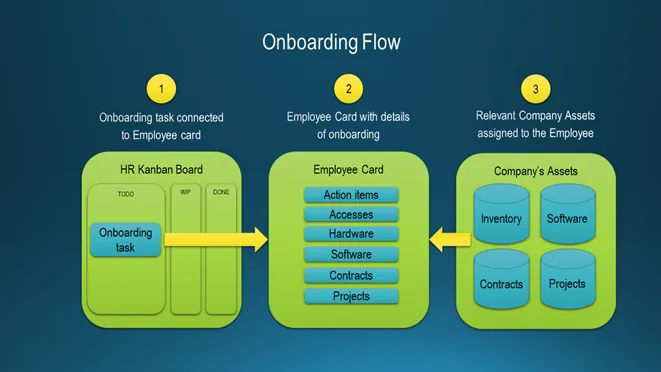
The process will have following actors: HR person, New Employee, Manager. The first step will be to create a task (4) for the onboarding and assign it to the Manager of the New Employee. In the task itself, HR person will add a link to the Confluence document where they will specify the list of standard action items.
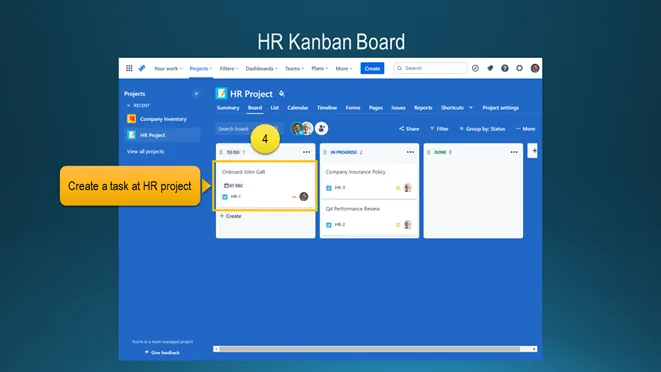
The reason of using a Kanban board with tasks is to increase the visibility across the teams. It becomes crucial when HR, hiring manager and the rest of the team members has a lot on their plate, so that they need to make a decision on priority, dates, delegation or escalation of the items to achieve their goals.
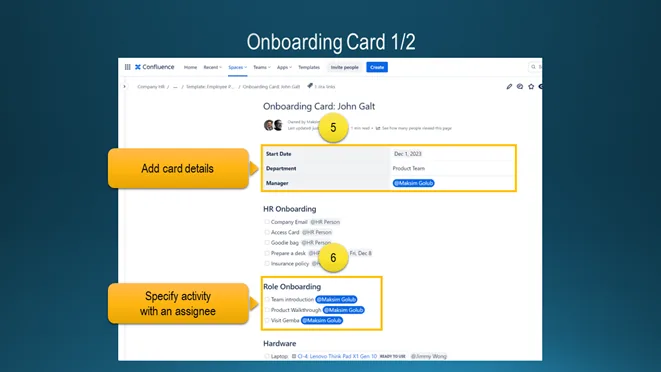
The Onboarding Card is the document on Confluence which can be copied. It consists of the general details (5), such as start date, department, manager details. The rest of it are the sections with tasks, each of it will have a user name and, if needed the due date. Once task is completed, user can check the box.
The Role Onboarding is quite important (6). It allows to Manager and New Employee to see the progress a plan accordingly. E.g., at one of the company newbies would go to the ground to have an end-to-end shopper experience. At another one there was a Buddy program to help people to acclimatize faster.
Besides of the standard tasks like creating logins, adding their fingerprints, we can list all of the available inventory in JIRA, label it, assign the statuses and then link to the specific employee. This will allow the IT department to manage repairs, updates, upgrades, replacement requests of assets from a single place (7):
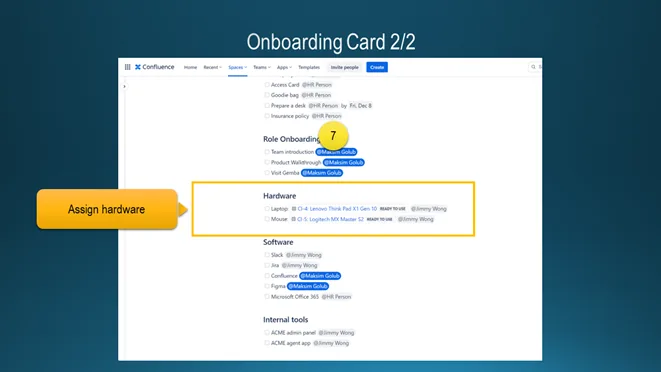
As part of the transfer, the stuff can get an access to the software and tools that the team uses. Sometimes there might be a different people handling the accounts, generating credentials, whitelisting IPs, providing VPN access, managing business contracts. It is important to plan and assign such tasks in advance (8):
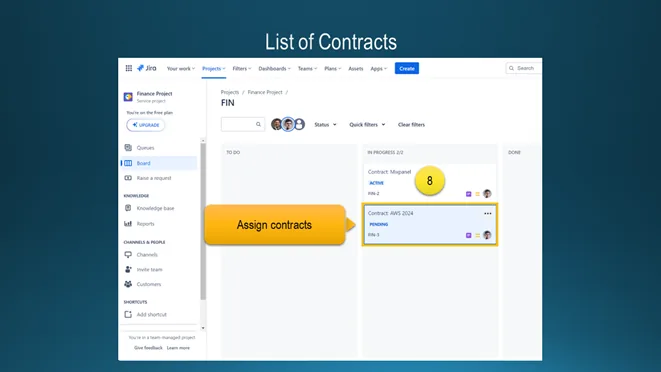
When a new joiner successfully gained both the knowledge and all necessary credentials, the company still will be using the onboarding documents to add new record there. The way we will set it is through the JIRA Service Desk where requests will be captured, executed, followed by updating card on Confluence.
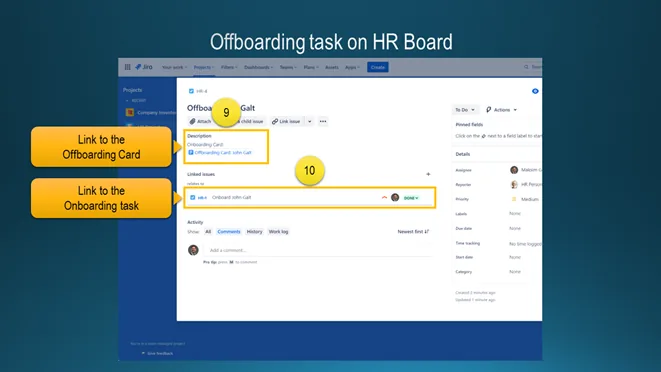
The final stage of the employee lifecycle in the company is the offboarding. The process is similar to Offboarding with the difference that the assets will be returned and accesses revoked. It starts with JIRA ticket linking the Offboarding Card (9) and previous onboarding ticket (10) for the reference of the Manager:
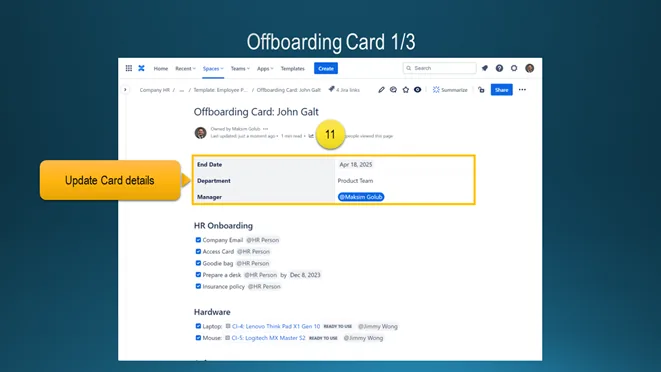
The Offboarding Card has pretty similar structure, specifying the last day of the employee (11). The easiest way is to create a copy of Onboarding card for such purpose. Some of the section will be missing as they are not transferable: for example, the Role Onboarding is one-directional and hence should be removed.
The new section that that should be hand over is the list of active or finished projects, so that the rest of the team can plan the Knowledge Transfer session. The second part will be the active or pending projects that employee oversaw. It is important to have them, ensuring that information and contacts won’t get lost.
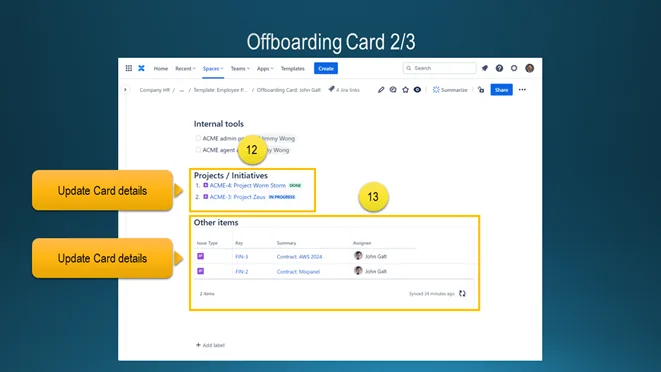
Once of the best practices here would be to have a separate repository for the contracts, so that Finance and Legal team could get an easy access to them or be the gatekeepers during the procurement process before adding new element. Another method is to use a shared email or group, instead of individual one.
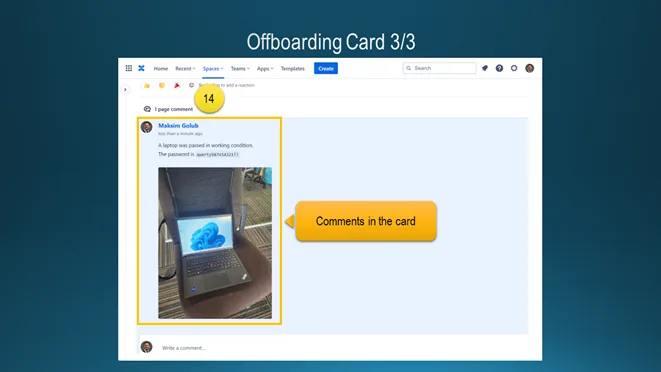
All participants can provide more details by leaving comments or notes right at the Offboarding Card. It comes handy when the user may want to upload photos, receipts, screenshots, files or anything else that would help to keep the information in one place or clarify ongoing issues, make the process smooth (14):
We reviewed the end-to-end flow for both onboarding and offboarding. As it was mentioned before, this set of tools provide robust functionality, allowing owners and stakeholders to design the flexible process of different sizes, complexity and depth to enable and empower the growth of their organisations at scale.